
[pdfwp_tool tool=”extract-pdf-pages”]
Introduction
Extract PDF Pages is a common activity for many people because users tend to deal with PDF documents regularly. Whether it is a business report, legal contract, a textbook, or online form, individuals use PDF files to retain the original document format on various devices. But not every part of the original document is required at all times. Therefore, users often need to extract specific PDF pages from the document and save them as a separate file.
What Is the Process of Extract PDF Pages?
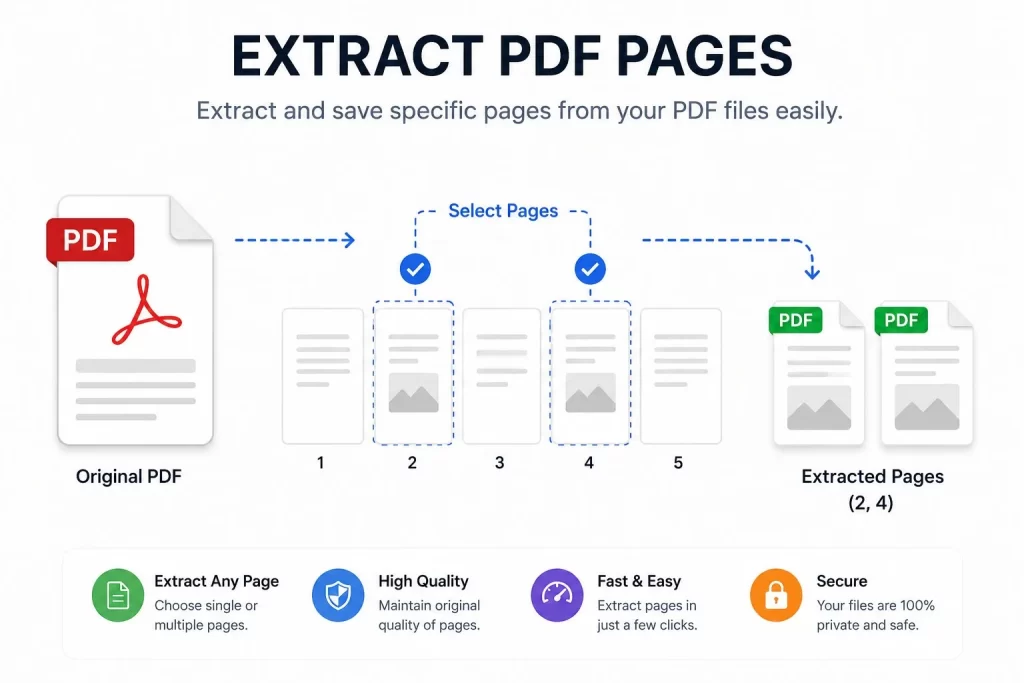
Extract PDF pages is the process of eliminating selected pages from a PDF file and saving them as a separate document. The activity helps minimize the number of unnecessary pages in the PDF file. Users can choose which pages they want to extract from the document in order to create a new file. The PDF pages extraction process is helpful in situations when individuals want to share a particular part of the original document.
Extraction Process Example
For example, if there is a research paper that consists of 100 pages, but only 10 pages are needed for printing, it is a good idea to extract the required pages and print them instead of the whole 100-page document. The process is simple because the original source file is not altered in any way. Only the necessary pages are taken out and saved as a separate file.
Common PDF Page Extraction Examples
PDF page extraction is applicable in a wide range of scenarios, including:
- Eliminating useless pages from the document
- Creating a separate file with essential data
- Saving paper when sharing information
- Extracting chapters from ebooks
- Saving reports with specific areas of interest
- Preparing source files for submission
- Improving file organization
Also Visit it
Reasons Why People Need to Extract PDF Pages
There are multiple reasons why an average person would want to extract specific PDF pages from a document. Large PDF files contain more information than needed for every situation. Individuals and businesses want to delete irrelevant pages and only keep what is necessary. Below are the main benefits of the PDF pages extraction process.
1. Saving Time and Increasing Productivity
When people work with lengthy documents, they spend more time searching for the necessary information. The PDF page extraction process will help locate the relevant pages and delete unnecessary ones. The activity is especially beneficial for students who extract specific pages from the textbooks for better learning organization. Similarly, business professionals can save time by extracting the required pages from reports.
2. Decreasing PDF File Size
Larger PDF files take more space on the hard drive or server. Having too many thick PDF documents is a problem for any individual or business. Extracting the necessary pages will minimize the file size and make the file easier to manage.
Reduced PDF files can also be shared between individuals faster via email and online platforms since they do not require a lot of storage space on the user’s devices.
3. Improving Document Organization
Many people have hundreds of PDF files to organize on a regular basis. Extracting pages from the PDF documents is one of the quickest ways to sort these files. For example, a business can extract only the invoices from a file, while separating the essential pages for the legal department.
How to Extract PDF Pages Online?
PDF pages extraction online is a convenient option because there is no need to install any software. The activity only requires a stable internet connection and an adequate PDF page extraction tool.
PDF Pages Extraction Instructions
Below are the instructions for extracting PDF pages on the online platform:
- Choose an online extractor tool that is compatible with all operating system types.
- Upload the desired file on the platform.
- Select the preferred pages, which need to be extracted from the source document.
- Extract the chosen pages and download them on the device.
Extract PDF Pages Using Different Methods
There are several ways to extract pages from a PDF file. Every option depends on the device used by the individual. In addition, some tools only have specific features for Windows or Mac OS. Below are the different extraction methods:
1: PDF Pages Extraction Online
Extraction online is the fastest way to extract the necessary pages from PDF because the tools are compatible with all types of systems. The option is perfect for individuals who want to use online platforms to access and extract PDF pages.
Pros of the Online PDF Pages Extraction
- No software installation
- Available in Windows, Mac, Android, iOS
- Easy to use
- Fast process
- Accessible in different locations
Cons of the Online PDF Pages Extraction
- Requires a stable Internet connection
- Files sent to an online tool might be at risk
- Some free tools only offer limited extraction features
2: Page Extraction Using Desktop Tools
Professional page extractor desktop software provides more tools for the extraction process to be completed. The activity offers more control over the document since it is possible to extract multiple pages and sort the files.
3: Extract PDF Pages Using Mobile Devices
In recent years, people often use their mobile phones to manage PDF documents. The activity became easier because the PDF applications allow users to extract the necessary pages from the document. Mobile extraction is appropriate when a person needs to edit the file instantly.
Extract PDF Pages Benefits
An online extractor tool has multiple benefits over traditional document processing. Below are the advantages of a PDF Page Extractor Tool:
| Feature | Benefit |
|---|---|
| Quick Processing | Time-Saving |
| Easy Interface | No Experience Needed |
| No Formatting Loss | Quality Retained |
| Page Selection Flexibility | Fewer Mistakes |
| File Organization | Time-Saving |
| Multi-platform Access | Convenient at Any Location |
The Most Common Features of the Page Extractor Tools
1. Easy Interface
A competent extractor tool will be easy to use by people from all backgrounds. The application will not have complex settings and confusing navigation. An individual can extract the desired pages without any extra effort. The tool only requires several simple steps, including file uploading, page selection, and downloading the desired file.
2. Quality Results
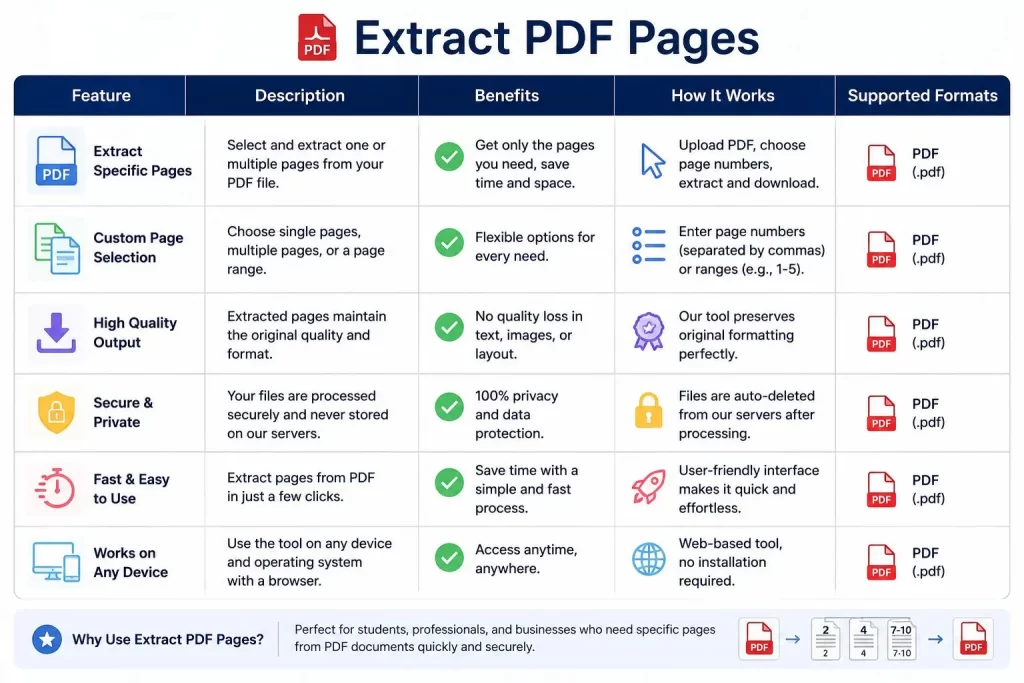
It is important to ensure that the extracted PDF document will not lose its quality during processing. The page extractor tool should have the following high-quality results:
- Retained document formatting
- Sharp text and image quality
- All page elements
- Appropriate font style
- Perfect page layout
3. Security and Privacy
Many people are worried about the security of their personal data. As such, a competent extractor tool should have strong data protection. The option ensures that the user’s files and information will remain safe on both the platform and device.
4. Multiple Selection Options
A good page extractor tool should have multiple options for removing the unnecessary pages from the file. Users can choose to extract individual pages, range of pages, or all the selected pages from the source file. In addition, a competent tool will have a preview feature to ensure the accuracy of the selection before downloading the file.
Extract PDF Pages vs. Split PDF
Many people confuse the PDF pages extraction with the splitting of a document. Both activities result in smaller PDF files, but there are significant differences between the two actions.
| Option | Description |
|---|---|
| Extract PDF Pages | Selecting desired pages |
| Splitting PDF | Splitting one PDF file into smaller files |
| Extract PDF Pages | Producing one customized PDF |
| Splitting PDF | Creating multiple similar files |
| Extract PDF Pages | Choosing necessary pages |
| Splitting PDF | Dividing files by default |
As seen in the options above, it is essential to remember that extraction is a selective process, whereas, splitting PDF files means dividing one file into several sections.
For instance, if there is a 50-page PDF study guide, but only pages 5, 15, and 30 are needed for a particular subject, the extract pages option would be appropriate for the user. If there is a 100-page document, which has to be divided into five files, each with 20 pages, it will be easier to use the split option. Understanding the main differences between the two terms will help make the PDF management process faster.
Extract PDF Pages on Different Devices
In this day and age, it is possible to use various devices for completing different tasks. Therefore, it is essential that an Extract PDF Pages tool is compatible with all platforms. An individual can extract pages from the PDF file on a personal computer and continue working on a mobile device.
How to Extract PDF Pages on Windows OS?
The Windows operating system has enough tools for completing the PDF page extraction process. There are plenty of online extractors one can easily access to extract the necessary pages from a PDF file.
Windows Page Extraction Instruction
- Open PDF extractor tool.
- Upload the desired PDF document.
- View all the available file pages.
- Tick the checkboxes next to the necessary pages.
- Extract the chosen pages and save them as a new document.
Most people choose to extract PDF pages online because it is a time-saving option and there is no need to install any software.
Benefits of Extracting PDF Pages on Windows PC
- Applicable for large PDF files
- Easy multi-page selection
- Saves storage space on a device
- Allows creating organized files
- Reduces sharing time with others
How to Extract PDF Pages on Mac?
Extracting pages from the PDF file is similar in Mac OS to the process of doing it on a PC. Individuals can either use the default Preview tool or apply online page extractor to sort the file.
Mac Page Extraction Instruction
- Open the source PDF file with Preview.
- Open the thumbnails view at the top of the document.
- Choose the desired pages in the view.
- Place them in a new file and extract the necessary pages.
The process can be helpful when a person needs to organize the paper-based content.
How to Extract PDF Pages on Android Devices?
With technological advancements, people use mobile phones for almost every task. PDF management is no exception to the rule, which is why there are PDF extractor tools for Android devices.
Instructions for Page Extraction on Android Devices
- Install a reliable extractor application.
- Upload the desired PDF document.
- Select the unnecessary pages.
- Extract the desired pages from the source file.
- Save the new document to proceed with the editing process.
The tool helps users manage their files and edit them whenever needed.
How to Extract PDF Pages on iPhone and iPad?
Apple provides a variety of tools to manage digital documents. As a result, it is now possible to extract PDF pages on an iPhone and iPad. The process is similar to the one used on Android devices. In a few simple steps, people can extract the required PDF pages and save them as a separate file.
Reasons for Using Extract PDF Pages Tools by Industry
PDF documents are used almost every industry because of their reliability and convenience. Extracting PDF pages is essential when the source file has too many pages for a particular purpose.
Education
Students and teachers benefit from the page extraction process because they often need to organize their paper-based content.
Education Sector Page Extraction Benefits
- Creating study pages
- Extracting chapters for easier studying
- Making educational notes shorter and more manageable
- Sharing study resources
For example, students can extract the required chapters from a thick textbook instead of carrying it around in a backpack. Similarly, teachers can extract certain sections of the book for their students.
Business
Employees need to extract pages from PDF files to manage their financial reports and other essential documents.
Business Sector Page Extraction Benefits
- Organizing financial reports
- Creating relevant employee files
- Managing contracts
- Separating the invoices
- Sorting business proposals
For instance, managers can extract specific pages from the yearly financial report before sending the document to a team of employees.
Legal
Legal documents have hundreds of pages that need to be sorted and filed accordingly.
Legal Sector Page Extraction Benefits
- Taking out irrelevant evidence
- Extracting specific pages for the parties involved
- Managing case files
- Arranging legal reports
Since legal documents often contain sensitive information, lawyers need to use reliable extractor tools.
Healthcare
Doctors need to extract PDF pages to manage medical records and patient reports more efficiently.
Healthcare Sector Page Extraction Benefits
- Extracting test results
- Accessing test reports faster
- Making patient’s records more organized
- Keeping the medical history of patients sorted
Because of the critical nature of health-related data, the healthcare sector makes sure the pages are extracted by reliable tools with advanced security features.
Extract PDF Pages for Improving Document Management
It may be challenging to manage hundreds of PDF files without improving the organization. Extracting PDF pages creates the opportunity to store documents in a better manner. The process minimizes mistakes, increases productivity, and simplifies file sharing and collaboration. Below are some document management benefits of the PDF page extraction process.
Document Management Benefits of Extract PDF Pages
| Benefit | Description |
|---|---|
| Accessing Information Faster | Organized files allow people to locate the necessary documents faster. |
| Better File Organization | People can store their data more efficiently and retrieve the information whenever needed. |
| Simpler Sharing Methods | The reduced file size eliminates the need for extra measures of sharing. |
| Easy Collaboration Opportunities | Collaborating with others is made easier with well-structured files created through the page extraction process. |
Extract PDF Pages Without Quality Loss
One of the most common concerns about the PDF page extraction process is whether the document quality will deteriorate after extracting some pages.
Maintaining Document Quality When Extracting PDF Pages
A competent page extractor tool will retain all the text, graphics, font, and layout quality when extracting pages. The file will look identical to the source document. Therefore, people can expect to get the exact quality of the chosen PDF pages. However, it is important to keep in mind that some PDF extractors might not preserve the source quality.
Tips for Maintaining PDF Quality
- Always choose a competent extractor tool
- Avoid extra processing to maintain the source quality
- Check the extracted files before sharing to ensure that nothing is missing
Common Issues During Extracting PDF Pages
The issue while extracting PDF pages can easily be solved even though it seems to be complicated. In order to address the challenges that may arise during the extraction process, it is essential to understand the problems. Below are some of the common problems when extracting the pages of a PDF file.
Password-Protected PDFs
Some PDF files require passwords to edit or extract pages.
Solution: Always authorize or ask for permission from the owner when editing or extracting pages of a PDF file with a password.
Poor Quality After Extracting Pages
Some online tools fail to maintain quality after extraction.
Solution: Always use reliable extraction tools to maintain the PDF file structure and quality.
Large File Processing Can Take Longer Time
It may be possible that larger file processing takes a lot of time.
Solutions: To avoid long processing times, it is essential to use a strong and reliable internet connection to extract pages. Compress the PDF file or use advanced tools for large-scale operations.
Incorrect Page Numbers Are Selected For Extraction
The extraction process can be complicated when an individual selects the wrong pages.
Solution: Always check the page numbers before finalizing the extraction process.
Online Extract PDF Pages Tools Vs Desktop Software
It is essential to compare the differences between using online extract PDF pages tools and desktop software. The table below compares the two:
| Feature | Online PDF Extractor | Desktop PDF Software |
|---|---|---|
| Installation | Not required | Required |
| Accessibility | It can be accessed anywhere | It can only be used on a computer where it was installed |
| Speed | It is fast for smaller PDF files | It is faster for larger PDF files |
| Advanced tools | It has limited advanced tools for editing | It has advanced professional tools for editing |
| Requires internet | Requires internet connection | Not required |
| Best for | Quick PDF extraction | PDF extraction for professionals |
Expert Tips For Extracting PDF Pages
Experts recommend a few useful tips when extracting PDF pages. Below are some of the expert-level tips when extracting PDF pages:
Organize Pages Before Extraction
Before extracting, it is essential to organize pages. A professional organizer knows the exact page he needs to extract before extraction begins. This will prevent:
- Redundant extraction
- Wrong pages from a PDF file being extracted
- Wastage of time and other resources
Use Preview Feature to Check For Page Accuracy
Most advanced tools have a feature that allows a user to preview a document before finalizing the extraction process. This way, an individual can check the pages he intends to extract and ensure they are accurate. It is crucial to utilize the preview feature, especially when extracting pages from large PDF files.
Rename Extracted Pages Properly After Extraction
It is always essential to rename extracted pages after the extraction process is complete. Below are some of the reasons why renaming should be done:
- The renamed pages help keep track of different pages extracted from a PDF file.
- It enables every page to have a meaning attached to it, for instance, Marketing_Report_Section.
- It helps avoid confusion when dealing with similar files.
Secure Confidential Information After Extraction
Confidential files should always be secured after extraction from a PDF file. This can be done by encrypting or setting a password on the extracted file. Below are some of the encryption options:
- Setting a secure password encryption
- Storing the extracted pages on a secured system
Advanced Ways To Extract PDF Pages Easily
With the increasing use of PDF files, advanced ways of extracting PDF pages are being utilized. The basic knowledge of extracting pages of a PDF file is not enough. Some advanced ways of extracting pages from a PDF file include:
- Extracting multiple page ranges from a PDF file
- Extracting pages from a PDF with a password
- Extracting multiple PDF pages at a time
- Combining extracted PDF pages to form a new document
- Organizing extracted PDF pages in a specified manner
Extract PDF Pages in Bulk
Bulk extraction of pages from a PDF file involves a user extracting multiple pages of a PDF file without having to open the PDF file. Extracting PDF pages in bulk has become very common as businesses deal with a large amount of digital data. The ability to extract pages from a PDF file in bulk is important for:
- Students preparing course files
- Researchers dealing with large amounts of data from various resources
- Teachers preparing class notes or materials
- Business owners maintaining digital data about their business
Benefits of Extracting PDF Pages in Bulk
- It provides a faster way of extracting pages from a PDF file especially when a user has a large amount of data to extract.
- Saves a lot of time for an individual since he does not have to open and extract PDF pages one after another.
- Helps maintain a good workflow for an individual or a business.
- Helps manage a large collection of PDF pages or data.
Extract Specific Pages Of A PDF File
The most common reason why most people are interested in knowing how to extract PDF pages is that they wish to extract specific pages from a PDF file. A user can decide to extract any of the following:
- One page from a PDF file
- Multiple pages from a PDF file
- A complete range of pages from a PDF file
- Specific chapters or sections from a PDF file
Example
Assume there is a business report with 200 pages, however, only pages 20, 35, and 50 are needed. Instead of sharing the whole business report to get the specific pages, one can extract the specific pages needed and form a new document.
How to Extract Pages From a Password-Protected PDF File?
Most people prefer a browser-based tool because it does not require a user to go through the hassle of installing a new application on his device. An online page extractor allows a user to extract PDF pages directly from his browser without the need to install any application.
Benefits of Using an Online PDF Page Extractor
- Do not need to install any application
- The tool can be used on different devices
- Easy to use
- Fast document processing
- Can be accessed from anywhere
Online PDF extracting tools are best for people who are not PDF experts and only want to extract a few pages. However, it is essential for a user to ensure the security level of online PDF extractors when using them. The best option is to use a reliable and trustworthy online PDF extractor tool to avoid compromising the privacy of the documents being processed.
How Extract PDF Pages Improves Productivity
Document management is crucial for personal and business productivity. When unwanted pages are extracted from a PDF file, a user can focus on other productive tasks. Extracting PDF pages can increase productivity in various ways:
Speeds Up the Research Process
A researcher can extract pages of a PDF file containing relevant information to speed up the research process. This way, the researcher can avoid going through the whole PDF file.
Enhances Team Collaboration
Collaboration between different people is made easy through extracting the specific section from a PDF file. For instance, a project can be split into sections of a PDF file and shared with different people who will work on it.
Simplifies Document Management
A worker can extract specific pages from a PDF file and use them to prepare a presentation or print out a document for a meeting. This will speed up the documentation process for an individual or a business.
Reduces Digital Clutter
A PDF file can have some unwanted pages. The unwanted pages may take up a lot of storage space; thus, when extracted, it will free up space on a hard drive or a phone.
Security Tips For Extracting PDF Pages
With the increase in PDF document management, document security has become a matter of concern. Most PDF files contain important and confidential information. Some of the security considerations when extracting PDF pages include:
- Confidential information such as personal information, business records, financial records, and legal information should be extracted with caution.
- Before uploading a confidential document to a PDF extractor tool, it is essential to ensure the security measures adopted by the tool.
- A reliable PDF extractor should offer strong security features to protect a document. It is vital to choose a PDF extractor tool that offers:
- Secure transfer of documents
- Strong privacy and encryption of documents
- Tools that allow deleting of documents from the extractor system
- Avoid using unknown websites as they might store or share the documents uploaded on them.
Extract PDF Pages Vs Copy and Paste
Some PDF document users can prefer the manual way of copying and pasting selected texts instead of extracting the PDF pages. Although the two processes are different, they are used for the same purpose. Below are some of the differences between extracting PDF pages and copy-pasting:
| Extract PDF Pages | Copy and Paste |
|---|---|
| It results in forming a new PDF | It copies text, images, and other elements of the PDF file |
| Maintains the quality and formatting of the original PDF file | May result in loss of PDF formatting, especially when using a copy-paste feature |
| Maintains the PDF images and layout | It only copies select text and does not copy the images or PDF layout |
| It is faster when sharing a PDF document | It is better when one needs to edit selected texts of a PDF file |
Best Practices Of Extracting PDF Pages
Some of the best practices of extracting PDF pages include:
Always Preview PDF Document Before Extraction
Before extracting a PDF file, the process of previewing the document is essential. This ensures that a user knows what he is extracting and avoids extracting unwanted pages. It is also important to avoid extracting pages of a PDF file without previewing since it can lead to a waste of time and energy.
Avoid Deleting Original Files After Extraction
One should never delete original files after extracting PDF pages. This is because it may be necessary to extract additional pages in the future.
Check The Extracted Pages After Extraction
After extracting PDF pages, it is essential to check and confirm whether the extraction process was successful. The following should be checked:
- Whether the extracted file is in the right order or not
- Text content quality
- Layout of the extracted file
- Whether the image quality was maintained
Rename Extracted File Appropriately
Every extracted file should have a title or name that describes the type of file. An appropriate name helps in finding a specific file easier among other files. Below are some examples of PDF extracts titles:
- Research_Chapter_Extract.pdf
- Company_Report_Pages.pdf
- Project_Details.pdf
FAQs
What Does Extract PDF Pages Mean?
Extract PDF Pages is a feature that allows a user to extract specific pages from a PDF file and save them in a new PDF file.
Can I Extract PDF Pages Online for Free?
Yes, there are various reliable online extract PDF page tools that offer this service for free.
Does Extract PDF Pages Affect Quality?
No, a good PDF extractor should not affect the quality of the text, images, fonts, and formatting of the original file.
Can I Extract Multiple Pages From a PDF File?
Yes, the multiple pages option allows a user to extract multiple pages, all pages, or a specific range of pages from a PDF file.
Is It Safe To Extract PDF Pages Online?
Yes, it can be safe when one utilizes a reliable tool to extract PDF pages. It is important to avoid using free online services when extracting PDF pages as they may pose some security risks.
Can I Extract PDF Pages On My Phone?
Yes, a phone user can extract PDF pages using Android and iPhone online page extract tools.
What Is The Difference Between Extracting And Splitting PDF Pages?
Splitting PDF involves dividing one PDF file into two or more PDF files. On the other hand, extracting PDF pages is a process of extracting specific pages from a PDF file to form a new PDF file.
Is It Possible to It From a Password-Protected PDF?
One can extract pages from a password protected PDF file only when he knows the correct password or has authorization to access the file.
Final Thought
At a time when everyone is connected and communicating with each other, and things need to get done on a daily basis, extracting PDF pages has become a necessary tool for all individuals. This can be used for extracting any kind of document, be it for a business, school or even personal work. Having the ability to extract PDF pages can help with so many different tasks and make it more efficient.
The best thing is that there are so many different methods and ways to extract these pages. There are free online sites that can help you, advanced computer programs that allow you to edit, and even phone applications that can help with small jobs. All you have to do is find the one that works best for you and fits your needs.