
[pdfwp_tool tool=”online-pdf-editor”]
Introduction Of Online PDF Editor
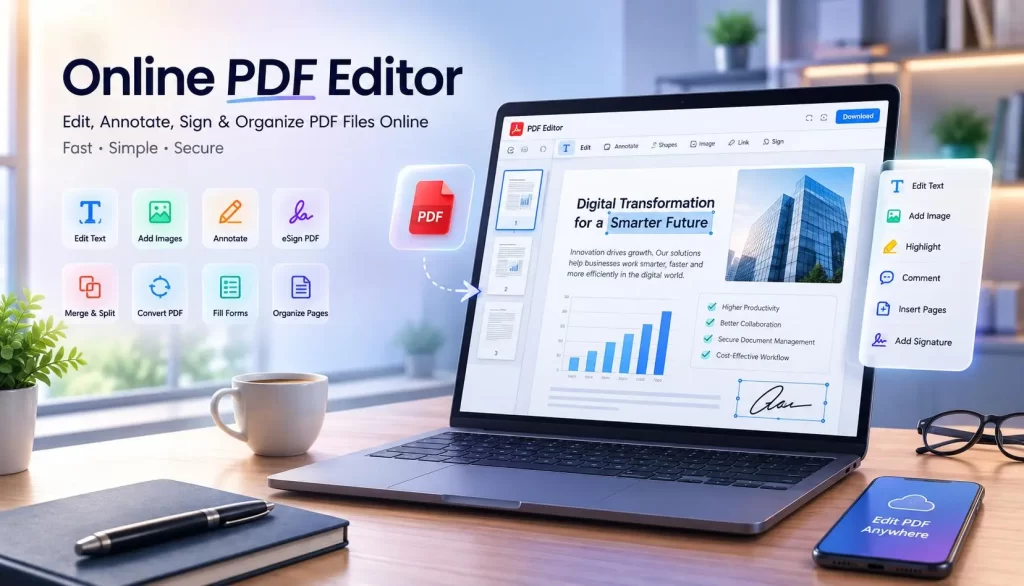
Getting around a difficult PDF document doesn’t necessarily mean you need tedious software. For easy document management and fast workflow, use our browser-based PDF editor online instead of downloading!
Why waste more money on expensive software when it’s possible to modify files directly in your browser? Download or print documents from your home or office computer with no extra hassle.
There are various ways to modify, fill, and edit PDF documents; however, an Online PDF Editor streamlines the process while ensuring document security. Our intuitive PDF Editor is accessible on any device. Edit any PDF is the best online PDF editor to edit PDFs on the go—from filling forms to creating digital signatures.
An Online PDF editor can help you in so many ways, and our purpose is to provide an efficient yet effortless experience when interacting with any PDF document.
What Is an Online PDF Editor?
(It’s not what you think—it’s much simpler!)
For the purpose of explaining, let’s break down an online PDF editor as a type of tool that enables users the ability to make edits to Portable Document Format (PDF) files and PDF forms through their web browsers.
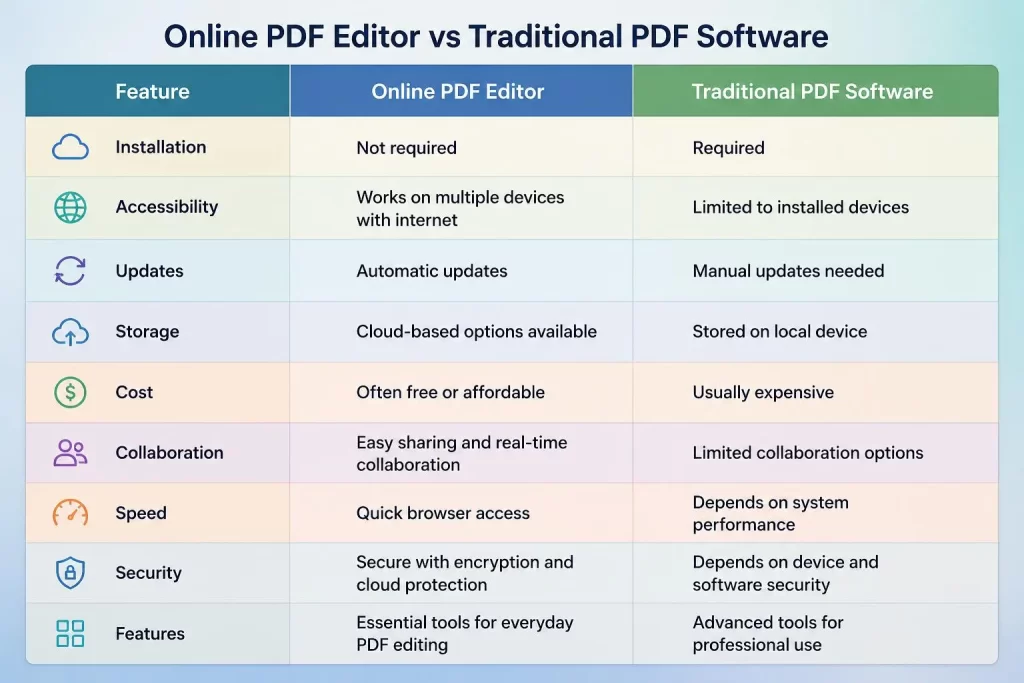
Traditional Approach vs. Online Solution
| Traditional Approach | Online PDF Editor |
|---|---|
| Downloading desktop applications | Completely web-based tools |
| Often requires payment | Free to use |
| Takes additional storage space | No storage required |
| Limited to one device | Accessible anywhere |
Key Advantage: Our online PDF editors are completely free, web-based tools. It requires NO SOFTWARE INSTALLATION—everything happens in your browser.
Key Features of Online PDF Editors
1. Text Editor
Some PDF files require small changes—a word edit here, some new data entry there. No problem! Our tools allow for any sort of changes you need, small or large, without disturbing the file integrity.
2. Images and Graphics
Our PDF Editor helps you add images and graphics to your PDF document without having to utilize a separate photo editing program. You don’t just import your PDF and edit it—you can now add new images of your own.
3. PDF Annotation Tools
Mark up a PDF file so others can review it clearly. Annotation features range from:
- Drawing directly on PDFs
- Adding comments
- Underlining sections
- Highlighting text
These are helpful for team collaboration!
4. File Compression
With an ever-increasing amount of files being used, compression comes in handy. Reduces file sizes for quick sharing via email, contributing to an effective document management workflow.
5. Form Filling
The easiest way for students, professionals, or anyone to fill in PDF documents. Our online PDF form editor enables filling out and saving PDFs and forms. Use text boxes or images to add your signature in any PDF. Now it’s easy to fill and sign any PDF.
Why Use an Online PDF Editor?
Many individuals still turn toward desktop applications to edit documents—that’s fine if you want to pay for software that takes space and time. If you want to take your workstation anywhere you go or just want to save money, an online PDF editor can perform most tasks the average person/business professional needs for free!
Key Benefits:
| Benefit | Description |
|---|---|
| Access from Anywhere | From the comfort of your couch, to the office, or while traveling—as long as you have internet access and a browser, you’re ready to edit |
| No Installation Needed | Get straight to work after uploading your PDF—no tedious downloads of large software programs |
| Productivity Boost | No need to save your PDF, convert it to an editable format, save it, then convert back and upload—the online PDF editor does this all in ONE step |
How to Use an Online PDF Editor
The process of using an online PDF editing tool is simple and easy:
Step 1: Upload Your PDF File
Upload your PDF file to our tools. Free and SECURE!
Step 2: Edit Your PDF Online
Use our array of easy-to-use editing tools.
Step 3: Download Your Edited Document
It’s yours! You can now download the newly modified PDF document on any device.
Online PDF Editor vs. Desktop Software
Download PDF software that you download online typically is pricey and will monopolize your hard drive’s storage. Also, your computer will have to be one particular device—you must download and install it on each device in order to access it.
The beauty of the Online PDF Editor is not just in its ability to assist you in editing your documents, but also its efficiency, as well as being entirely complimentary to usage.
Comparison Chart
| Feature | Online PDF Editor | Desktop Software |
|---|---|---|
| File Size Reduction | Reduces and converts documents to an editable file format; saves valuable disk storage | Usually needs a paid plugin or advanced PDF editor for compression |
| File Type Conversions | Converts multiple file types into PDF format; files are consistently ready | Limited in this ability; typically requires an advanced editor or third-party software |
| Accessibility | Any device with internet access | Must install on each device separately |
| Cost | Free | Often expensive with license fees |
| Updates | Always up-to-date automatically | Manual updates required |
How to Choose the Best Online Document Editor
The process of picking an appropriate PDF editor might be confusing when there are so many choices available. Here are key factors to consider:
Security Considerations
- Use Secure Websites
- Ensure your documents are safe and sound
- The online PDF editor you select should have proper encryption technology in place for document protection
- Especially important for storage of your documents
- We offer secure encryption so your information stays private
- Don’t Download Sketchy Programs
- There are plenty of malware and virus programs disguised as helpful PDF editing software
- If you doubt it, don’t download it
- Delete Your Documents from the Website
- Once you’re finished editing, you may want to remove or secure your PDF for final privacy assurance
- With our online PDF tools, you do this by default
Security of Online PDF Editors
Data security is one of the major considerations users are often careful about before submitting their documents to any online software. Users want to protect personal and confidential information.
What to Look For:
- Encryption technologies for document protection
- Data protection policy while maintaining safe access
- Retention limits for documents
- Automatic file deletion after processing is complete
Important: Online PDF editors should never keep copies of your files once they’re done. Users should never upload very confidential, private, or business-critical data without verification.
Advanced Features of Modern Online PDF Editor
Besides basic document alterations, advanced online PDF editors are feature-rich and capable of supporting complete workflow processes, saving time and minimizing the need for using multiple applications.
1. PDF Conversion Options
Online PDF editors enable users to convert files of one type into another. Converting documents facilitates easy sharing and editing when they have been saved into a different format.
Supported Conversions:
- PDF to Word
- PDF to Excel
- PDF to PowerPoint
- Image to PDF
- Word to PDF
Example: When your business employee sends a report as a PDF format, you can convert it into an editable Word document to make changes.
2. Merge and Split PDF Documents
Multiple documents into one may get confusing. An online tool can easily help you manage your files:
- Merge: Create one document composed of all your documents—a well-organized, professional-looking report
- Split: Split a larger PDF document into smaller parts and excerpts for organizational, file-size limitations, or easy sharing convenience
This feature is particularly handy for managing contracts, invoices, and financial transaction documents.
3. Fill in PDF Forms
Most businesses utilize digital forms to process applications, registrations, and approval procedures. These digital documents are fillable in a PDF editor and application which allows users to:
- Fill in personal data
- Provide checkbox ticks
- Insert signatures
- Email documents
- Save filled forms
This is easier for everyone who doesn’t want to print then fill the information on hard copy—it’s also eco-friendly.
4. Add Watermarks
Adding logos, business names, personal details, copyrights, or draft version status on your documents offers information and security on data.
Common Uses:
- Official logos for companies
- Prevent unauthorized reuse
- Protect confidential business files
- Brand marketing
- Show manuscript draft state
Customization Options:
- Appropriate text color
- Transparency
- Opacity
- Scale
- Angle
- Orientation
Online PDF Editor for Business Productivity
Businesses greatly rely on digital records that consist of documents, data sheets, and others. Online PDF Editor serves to:
| Benefit | Description |
|---|---|
| Improve Document Management | Enable employees to quickly update or alter document formats for various uses |
| Enhance Workflow Processes | Simplify employee data administration, legal documents management, financial data management |
| Ensure Professional Look | Content generation for marketing or sales departments |
| Remote Staff Collaboration | Shared-access links allowing team members to review or update documents anytime, anywhere |
| Cost Reduction | Inexpensive software rather than investing thousands in costly licenses for traditional software |
| Paperwork Efficiency | Streamline all documentation processes |
Industry-Specific Applications
Educational Sector
Create assignments with free PDF editors for kids in addition to helping young learners learn how to draw and color online.
Healthcare Industry
Manage patient records, medical forms, and documentation efficiently and securely.
Legal Industry
Handle contracts, legal documents, and case files with proper security and formatting.
Real Estate
Manage property documents, contracts, and client information in a professional format.
Online PDF Editor vs. Free PDF Reader
Most individuals either use a free PDF viewer (like Microsoft Edge PDF reader, Chrome, Safari’s default built-in reader) or they download a full software suite which could include PDF editing tools. However, often a free PDF viewer is just that—a document viewer for PDFs.
Comparison Chart
| Feature | Online PDF Editor | PDF Reader |
|---|---|---|
| View PDF Files | Yes | Yes |
| Edit Text | Yes | Only in select few free PDF viewers; often requires paid upgrade |
| Add Image | Yes | No |
| Add Signature | Yes | Limited to viewing signatures; some readers offer rudimentary signature placement |
| Annotate Documents | Yes | Yes (most viewers allow commenting or highlight text) |
| Convert Files | Often Yes | Rarely |
| Modify Pages | Yes | No |
Key Insight: Online PDF editors offer extensive possibilities beyond merely reading an Adobe file. An online PDF editor offers unlimited options when you want something beyond reading a file online.
Top Online PDF Editing Websites
The top free websites provide all necessary document processing functions:
- Text editing
- Image management
- Creating files from scratch
- Combining files
- Reducing file sizes
- Compressing files
- Security features
- E-signing documents for business transactions
Why Choose Our Service:
- Save plenty of time, money, and effort
- Easiest method available for free
- No additional download necessary
- No slowdown of your personal computing system
Note: Free document editors will still come with some constraints, so a dedicated paid editor could be the best alternative in terms of performance and document management features that support small as well as large organizations.
Free vs. Paid PDF Editing Software
PDF editing software provides the best features for beginners as well as professionals. Here’s what to consider:
Free PDF Editors
- Basic text and image editing
- Limited features
- May include watermarks
- Good for occasional use
Paid PDF Editors
- Complete editing control of your records
- Advanced text and media handling
- Professional features
- Suitable for business use
Key Consideration: To be fair, there are generally not a huge deal with the free online PDF editor download alternatives; they provide most but not everything. For individuals or businesses that need something extra, this would be an expense that most people can’t resist to invest in just as soon as they attempt to make something important.
FAQs About Online PDF Editors
1. What is an Online PDF Editor?
An online PDF editor is a web-based tool that allows users to edit, modify, and manage PDF documents directly through their browser without installing any software.
2. Is it safe to use online PDF editors?
Yes, as long as you use reputable services with proper encryption and data protection policies. Always check the privacy policy before uploading sensitive documents.
3. Can I edit PDFs on my mobile device?
Yes! Most online PDF editors are accessible on any device with internet access and a browser, including smartphones and tablets.
4. What types of edits can I make?
You can edit text, add or remove images, annotate documents, fill forms, add signatures, convert file formats, merge documents, split files, and much more.
5. Will my document quality be affected?
Quality is maintained when using professional tools. However, always preview your document before final download to ensure everything looks correct.
6. Do I need to create an account?
Most basic online PDF editors don’t require account creation, making them quick and easy to use for occasional edits.
7. Can I convert PDFs to other formats?
Yes! Most online PDF editors offer conversion capabilities to Word, Excel, PowerPoint, JPEG, PNG, and other formats.
8. What happens to my files after editing?
Reputable services automatically delete your files after processing to ensure privacy and security.
Conclusion
An Online PDF Editor is the ultimate solution for anyone looking to edit and manage digital files from anywhere without installing cumbersome software. Whether you’re a student, professional, business owner, or casual user, these tools provide:
- Convenience: Access from any device with internet
- Cost Savings: No expensive software licenses
- Efficiency: Streamlined workflow in one platform
- Security: Proper encryption and file protection
- Versatility: Comprehensive editing features for all needs
Download PDF File Online Now — it’s free to download your documents in edited form!
Why let hassle affect your day? If you have a PDF that is giving you trouble and you just need it to work the way you need it to, use an online PDF editor and see how it can greatly enhance your PDF document workflow. It takes minimal time and you don’t need to install anything to help improve the efficiency of your working days.
Whether it’s a quick change on a PDF file or anything more involved, you will not have any issue at all with any file type, because at the end, they will all be PDF files.