
[pdfwp_tool tool=”merge-pdfs”]
Introduction
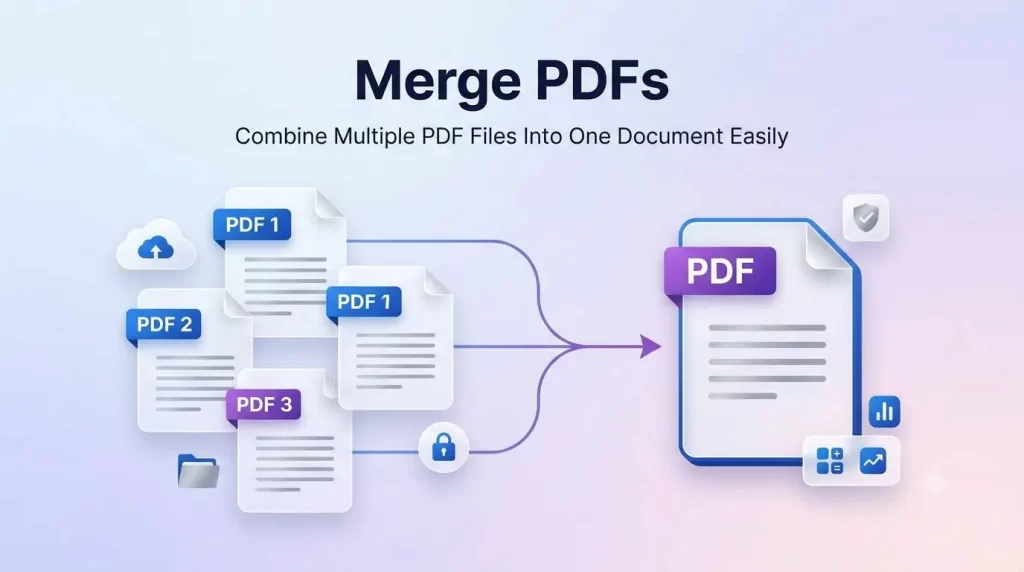
If you’re dealing with multiple PDF documents and find it challenging to organize papers, share reports, submit homework, or save critical information, there’s an easy solution. The alternative to managing individual files is to Merge PDF to a single document that is convenient for accessing, sharing, and processing.
The process requires users to merge PDFs in a single file without changing the source document format, layout, or quality of the pages.
It is suitable for users in academia, in the corporate world, or just to manage personal information. PDF is considered the trusted document in the current technology system as it preserves consistent appearance across devices and Operating Systems.
Converting various documents to single document using PDF merging can boost the user’s workflow efficiency, minimize clutter in files, and ensure professional digital records. This manual covers everything you need to know about Merge PDF, its advantages, operation, features, usages, comparisons with alternative technologies, safety-related aspects and the best strategies for managing the merged document.
What Is PDF Merging?
PDF merging refers to the practice of joining two or more PDF documents together to form a solitary PDF File, thereby alleviating the need to monitor or open several files at a time.
This approach is effective when merging documents such as an invoice, Contract, report, as well as many other business documents to keep track of everything and organize all needed Information in one document. Reliable PDF merging softwares can merge PDFs without distorting or editing the original files or the file Structure.
How the Merging Function in PDFs Works
The procedure involved in Merging PDFs can be split into following steps:
- Select each of the required PDF files.
- Upload the selected PDF docs to a PDF merging Software.
- Put order of files accordingly.
- Click the Merge Button.
- Download your unified file.
Modern online PDF tools facilitate users with prompt PDF merging and, hence no additional specialized skills are expected from the users for the accomplishment of the process.
Why Must You Merge PDFs?
The ability to join PDF documents produces various benefits. The merging operation is not merely helpful for businesses; it is beneficial for everyone, from students in schools to home users.
When you use Merge PDFs Online to Combine PDF you can enjoy many advantages. It will improve and create seamless workflow. Here are some benefits that come with joining PDF Docs.
1. Ease in Document Organization
Manage several files? When dealing with many document files, the task to organize document and find desired ones might be time consuming and sometimes difficult to handle.
You save time and space, which is a vital advantage you get when you use PDF combining function.
For example:
- Merging monthly reports into annual report
- Combining multiple documents into single document
- Compiling research materials into papers
- Organizing project details into separate binder
A combined PDF file helps you stay away from confusion.
2. Improved File Sharing Ability
When you have several PDF files to share with someone else, sending each file as a separate attachment could confuse.
Instead, merge several files into ONE PDF before sending. It is very helpful today for:
- Business presentations
- Legal documents
- Reports
- Research papers
- Project works
A single file seems much more reliable to send.
3. Save Time and Be More Productive In Merge PDFS
You may waste considerable time sorting through, searching, opening and sending one and several documents to recipients. A merging process takes not only few minutes to combine as many PDFs as you want in one click, but can dramatically speed up your day’s work.
4. Creates Professional-Quality Documents
If someone needs to put together documents such as an official business report, an organizational presentation, a professional catalogue, financial statements etc., having multiple separate pages is not a good way to put things up together. Instead you can just try Merge PDFs Online to create single document that looks much better!
The 5-Step Approach: How to Merge PDF Online
Step 1: Choosing Merge PDFs of Work
Use a trustworthy tool, which safeguards files during the whole process of the upload, transformation and delivery. Make sure the file uploader processes documents smoothly and at high speed for best experience.
Step 2: Uploading the Documents You Wish to Convert
Upload many PDF files which may originate from your Hard drive or mobile devices or Cloud devices and begin merging the files as you upload them. Some PDF conversion tool permit drag-and-drop uploading of their uploaded files from your desktop.
Step 3: Rearranging the Documents if Needed
Before you click Merge or Join, the tool you chose must permit you to specify the desired sequence and ordering in which you upload them. They could have simple upward/downward arrow. Some PDF merger have ‘sort’ buttons to help you organize file much faster.
Step 4: Merging Papers Together
Click “Merge Files”, “Combine”, or “Join”. Once you upload you select Merge Files option for a seamless combination of PDF documents in single document in less than ten seconds.
Step 5: Download and Verify
After merging the PDF documents, you must Download your new-combined File. Ensure it’s exactly what you are looking for: a logically arranged file without errors, missing pages or other glitches.
It is a simple step but important to make sure the quality you’re looking for.
Top Benefits of Using Merge PDFs
Merge PDF online is a popular alternative that users prefer to use now. Here are some major advantages of merging PDF online.
No Installation Needed In Merge PDFs
Save yourself from the headache of having to download and install large program software on your computer by simply merging your PDF files online.
Your work is instantly backed up online, there is save from space on your computer, and of course this save from all complexities linked with software installations.
Compatible with Many Platforms
Works with different Operating System like Mac, Windows or Laptops to even Smart phones of the new androids to iPads which saves your time of switching between systems or having you convert documents for different Devices.
User-Friendly Experience
For beginners this is the simplest technique as it requires only a little understanding of modern technology.
This consists of simply upload the PDF files, organize the arrange, click merge to combine and downloaded to save your newly document to keep your projects neatly organized.
Key Aspects of Professional PDF Merge Tools
Not all merging tools offer the same benefits. When looking for merging PDF programs, it is important that it include relevant tools for optimal performance and quality.
| Characteristics | Benefits |
|---|---|
| Multiple File Support | Allows you to upload multiple PDFs |
| Drag and Drop Upload | Upload your files with ease |
| The Order of Pages | Allow you to order files |
| High-Quality Output | Preserve the existing format of the documents |
| Secure Processing | Protect against documents that were uploaded |
| Speed for Conversions | The files are processing faster |
| Cross Device Support | Can be used on various devices |
Common Uses of Combine PDF
There are many functions for combining documents in different professions and life situations.
Students & Education
Students combine several files when researching or preparing presentations.
- Merge the material to attend classes
- Combine different studies
- Compile the presentations
- Arrange notes
A combined PDF makes learning so much more manageable.
Business & Organizations
Businesses are always producing more and more paperwork so creating organised and classified records can simplify workflow.
Companies commonly bring together:
- Contracts
- Reports
- Sales reports and presentations
- Financial data
- Client records
- Employee paperwork
These documents, merged appropriately, increase efficiency and can reduce the hassle and stress of finding documents.
Personal Document Management
A merge documents for multiple purpose can make it useful for many of your personal documents.
- Mix together certificates
- Create an account
- Combine financial information
- Travelling documents
- Combine and mix receipts
- Combine application forms
Combine these files to make useful for later when you are accessing your documents.
Advanced Functions for Merge PDFs Online Tools
Today advanced merge tools include special functionalities to assist you in managing, organising, securing, and optimising your documents with maximum simplicity and speed. The standard merge PDF tool has evolved.
1. Drag-and-Drop Facility
When merging documents a merge PDF software which has features that allows drag-and-drop helps the user to arrange documents without tedious clicking.
Advantages include:
- More quicker uploadings
- Easy organization of documents
- Minimize the manual effort
- User-friendly Interface
These capabilities may be beneficial for those working in an organisational context for business purposes and education.
2. Reordering Page Customisation
Certain circumstances arise that necessitate rearrangement of pages and thus necessitate certain ordering before it’s transformed into a merged PDF file.
PDF merge features like this allow the manipulation and rearrangement of pages:
- Move pages from one PDF to another
- Document pages can be easily repositioned
- Delete unneeded pages
- Reverse the direction of pages
The arrangement must meet requirements before the document is merged.
3. Preserve Existing Quality In Merge PDFs
For the most part, the formatting elements of these PDFs would be largely similar to the source PDFs that contained them. Thus one of the best methods of obtaining a high-quality PDF is to use a file merged file that supports preservation of original formatting:
- Fonts
- Images
- Layout
- Tables
- Hyperlinks
4. Cloud Integration In Merge PDFs
A growing number of modern merge PDFs contain functions which may enable your computer to upload PDFs directly from stored location in the cloud such as Google Drive, Dropbox etc. Other such functionalities would enable other people to access the new PDF file that is merged.
Online Merging vs Downloading Software
The following data chart will be useful in helping you compare both the merge functions.
| Category | Online PDF Merger | Offline Software |
|---|---|---|
| Functions | Basic up to more professional functionalities | Advanced features |
| Cost | Numerous free options | Professional editions often charge a fee |
| Quality | High quality | Standard or best quality |
| Speed | Normally relatively fast | Professional quality can take some more time depending on document size |
| Cloud Uploads | Many merge tools are compatible with various cloud storage systems | Other tools or all tools do not allow these functions |
How to Merge PDFs Without Loss of Quality
You need to consider some guidelines in order to combine PDF files with the maintenance of high-quality documents.
1. Quality of Raw Materials
You will find it helpful in a merge of all files when you’ve sourced high-quality files from documents for you merge files as this is why some PDF’s look of a greater quality than others. When these were first written the quality you input is what you get out.
2. Not Use More Compression in Merge PDFs
Compressing and shrinking the size of the document results in diminished and lossy picture quality. Use less compression on the documents.
3. Format Compatibility
Make sure all documents you combine is compatible, otherwise your tool may return and bring about an unwanted result.
4. Check the Completed PDF
When you finally have your document finalized it is really advisable that you take a couple of minutes and check your merged document thoroughly.
- Check each page for any misplaced images
- Check the legibility of any text included in the new document
- Inquire as to whether all links are working
Security and Privacy When Merge PDFs
Since many PDFs contains sensitive personal and financial details, safety measures such as secure transmission and automatic file deletion are important for the process of the document or its deletion from its services.
Tips for Safe Merge PDFs
Use Trusted Websites
For this practice only use web pages you are familiar with to avoid document or personal details being taken illegally or from being stolen.
Use Password Protection to Secure Confidential Papers
If the new doc is made up of private documents like legal papers use password protection to enhance additional security of the documents.
Take Away Unneeded Data
For those who don’t need sure details include inside the new file, delete them prior to document upload so it will give extra privacy to your records.
Upload and Also Download AfterMerge PDFs
Since they often will end up deleted within a day by many PDF Merging tools or shortly in order, for all of our documents, it is recommended to immediately download and store it in safe location of your computer or your devices.
Common PDF Merging Errors
It would be unwise to overlook that not all PDF documents have exactly similar characteristics, though they appear to be of a single type. PDF merge is very simple, but several usual difficulties do occur during.
Huge File Size
When a user tries to merge files all of which are quite big in size it often gets into a situation to do upload for further work or even to download the result document due to size of data. Use file compression software post merger.
Misaligned Pages
Files may become rearranged and show up upside down. Check files and upload. Use of an online tool that saves or recognizes formatting.
Password Protection Issues In Merge PDFs
A PDF file that needs permission before viewing it can’t be merged with another document without opening it and providing appropriate permissions.
Expert Tips to Better Document Management
To better enhance and organize their digital work and even professional work, many documents may need merging. We can give you a few tips to improve the way you organize document in a PDF by combining.
1. Before Upload Rename Files
Prior to merging many of the above documents it’s a better organizational decision to reorder and rename your files prior to starting the process.
For example:
- 01_Project.pdf
- 02_Financial Data.pdf
- 03_Report.pdf
2. Group Together Files By Purpose
You should organise documents by category or purpose so it would be much easier to select.
- Business Documents
- Academic Documents
- Legal Documents
3. Back Up Data
You must always work from back-ups of original documents or scans so that you do always have an archive and backups of your documents if needed in the future.
4. Control File Size to a Optimum
Many applications will try and create documents that download and share relatively well but they all produce differently sizing documents for use in both the workplace and personal use.
Why Combine PDF is Necessary for Digitized Workflow
In the world we all live today most of our files are stored digitally. Combining numerous files not only saves on unnecessary storage but also minimizes complexity and helps ease of access in many settings.
It’s not uncommon to merge two or three documents and end up having several advantages with regards to how one can navigate, access, and even manage records within an organizational or even personal framework.
Featured Snippet Answer: How Do You Merge PDFs?
Combine PDFs by uploading several PDF documents to a PDF combiner, organize them in the desired sequence, choose to combine, and click to get merged PDF. The combiner combines the files into one PDF without changing their structure and appearance.
EEAT-Based Approach for Choosing a PDF Merger
The content that passes in Google’s eyes is one that provides Experience, Expertise, Authoritativeness and Trustworthiness. Here is a good PDF merging software, which is reliable.
Experience
A good PDF tool must be true to the needs of users. In natural language, the tool should address the common issues faced by users such as document management, sharing files, streamline workflow, etc.
Expertise
Professional PDF solutions provide advanced features including:
- File arrangement
- Quality preservation
- Security controls
- Format compatibility
Authoritativeness
Trusted PDF sites strengthen your authority by providing consistency, transparency and excellent response.
Trustworthiness
A secure PDF merger should focus on:
- User privacy
- Safe file processing
- Clear information handling
- Reliable results
Frequently Asked Questions About Merge PDFs
1. What Does It Mean to Merge PDFs?
Merging PDFs is the process of taking two or more PDF files and combining them into a single PDF document. Once merged, all pages are in one file instead of being in separate files. It is a great way to keep your files organized and get rid of unwanted pages.
2. How Can I Merge PDFs for Free?
You can also merge PDF files online for free. Just upload your PDF documents, arrange them correctly in the order you want, press the merge button and you can then download this new PDF file.
3. Does Merge PDFs Reduce File Quality?
Absolutely not! The quality of your file won’t decrease. A good PDF merger will maintain the same quality and formatting as the original files.
4. Can I Merge PDFs Files at Once?
Yes, most powerful PDF merging software supports merging two or more PDF files at once. If you often need to combine a lot of PDF files, this feature is a real time saver.
5. Is It Safe to Merge PDFs Online?
It can be safe, provided you choose a recognized PDF service. Good PDF websites will maintain security when handling your files and will typically delete your files after processing.
6. Can I Merge PDFs on Mobile Devices?
Yes. Several free or inexpensive web services can be run in the browser of smart phones or tablets to combine PDFs online.
7. Can I Rearrange Pages Before Merge PDFs?
Yes. Many of the PDF combination tools that I know provide the opportunity for people to change the order of pages before the PDF doc is combined.
8. Can I Merge Password-Protected PDFs?
Certain PDF tools offer support for password protected documents but you may require access to unlock the file before combining. Security restrictions vary based on your PDF security preferences.
Merge PDFs: Complete Comparison of Different Methods
Selecting the appropriate method to merge PDF documents will vary according to your needs, depending on your file size, security requirements and level of technical expertise.
| Method | Advantages | Disadvantages | Best For |
|---|---|---|---|
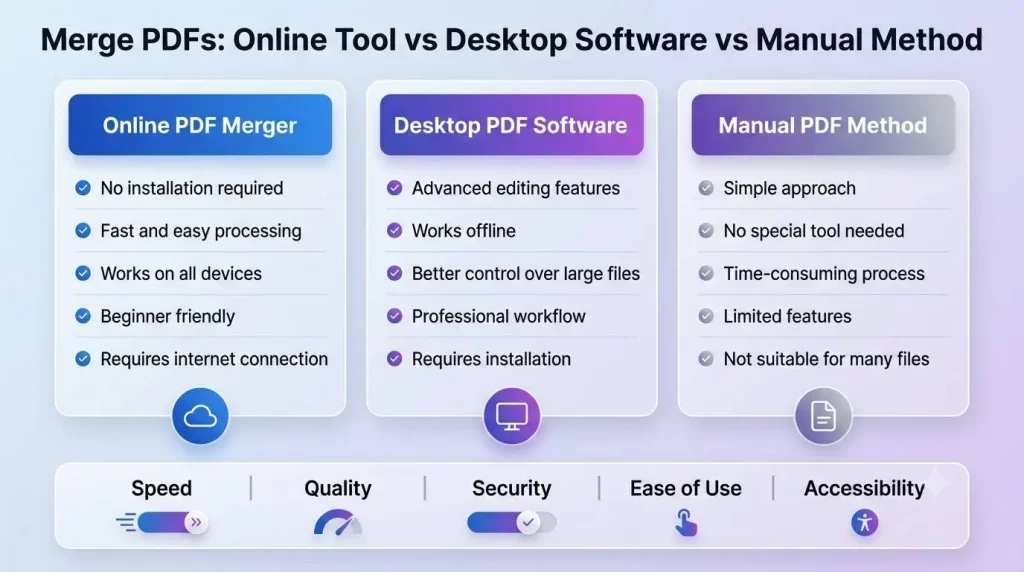
| Online PDF Merger | Quick and easy; No need to download and install; Any operating system | Internet access required | Beginners and everyday use |
| Desktop PDF Software | Advanced features; Can be used offline | May cost money | Professionals |
| Traditional Paper Method | Does not involve any other tool | Requires more than one person to create; Takes more time; Not suitable for big projects | Small tasks |
| Mobile PDF Apps | Easy to use on the go; Portable | Restricted to simple tasks | Smartphone users |
Best Practices for Merging PDFs Professionally
Using the correct techniques contributes to a well-structured, quality outcome PDF.
Organize Files Before Uploading
Arrange your documents by intent prior to merging – overcomes repeated merging of same docs and can save a lot of time and incorrect page ordering.
Use Clear File Names
Good naming helps management of documents.
Examples:
- Company_Report.pdf
- Invoice_March.pdf
- Project_Summary.pdf
Check the Final Document
Always review the merged PDF before sharing it. Confirm that:
- All pages are included
- The order is correct
- Images are clear
- Text is readable
Protect Important Documents
For confidential documents, use security techniques such as passwords and limited access.
Conclusion
Handling numerous PDF documents individually may be confusing and time-consuming. Use a Merge PDFs tool and bring all your document into one neat and professional file.
Regardless if it is as a student creating documents for assignments, a business combining files or an individual consolidating personal information, you can see that there are many uses.
A dependable PDF merger allows users to work efficiently, preserve the integrity of their files, and streamline their digital workflow. Functionalities such as reordering pages, encryption capabilities, and compatibility with various devices make it a valuable tool for users.